

.png?width=274&height=200&scale=canvas)


.png?width=500?width=274&height=200&scale=canvas)

.png?width=274&height=200&scale=canvas)

.png?width=274&height=200&scale=canvas)


Introduction
Welcome to this week’s CCL Staff Picks! Every week, we showcase popular products from our store that we as a team highly recommend. These picks represent the best value and performance that caught our attention – from budget-friendly PC cases to high-end components. Whether you’re building a new gaming rig or upgrading your setup, we’ve got something for everyone this week. (P.S. We do this every week, so stay tuned and subscribe to never miss out on staff picks, deals, and competitions!)
Quick Links
- PC Deals
- Monitor Deals
- Peripheral Deals
- GPU Deals
- Motherboard Deals
- RAM Deals
- SSD Deals
- Our July Deals
This Week's Top Picks
1. CiT Work Mid Tower Case – Black (Micro-ATX)

I picked the CiT Work Mid Tower Case as our budget case of the week because it delivers unbeatable value. At just £26.99, this Micro-ATX chassis offers a surprisingly solid steel build and a clean, professional look that fits any home or office setup. The design is minimalist black with an elegant front bezel – no flashy RGB or windows here, which is perfect if you prefer a discreet build that’s all business. Despite its compact size, the CiT Work has a spacious interior with support for standard ATX power supplies and graphics cards up to 315mm long. In fact, we were amazed that even some full-length GPUs can fit in this little case!
From a builder’s perspective, this case is beginner-friendly. There’s room for up to three 120mm fans (front, rear, and side) to keep your components cool. The airflow design includes a unique U-shaped vent on the front panel to improve intake, and the side panel even supports an extra fan for better circulation. I also appreciate the front I/O: you get one USB 3.0 and one USB 2.0 port plus audio jacks – all the essentials for everyday use. Another rare perk at this price is the inclusion of two external 5.25″ drive bays, which means you can still mount an optical drive or fan controller if you’re old-school like me. There are also plenty of drive mounts inside for SSDs and an HDD, making the CiT Work surprisingly flexible for storage.
Why We Love It: Simply put, the CiT Work case punches above its weight. It’s made from sturdy SPCC steel and built for reliability at a low cost. Building in it is straightforward thanks to thoughtful touches like cable management cutouts and an all-black interior that gives your build a clean look. We recommend this case to first-time builders, students, or anyone assembling a budget gaming PC or office computer. It’s also a great option for a secondary build or a media PC, where you want something compact and inexpensive yet dependable. While it doesn’t have tempered glass or pre-installed fans (you’ll need to add your own cooling), those are hardly deal-breakers at this price. The CiT Work proves you don’t need to spend a fortune to get a reliable, functional, and good-looking PC case – and that’s why it’s a staff pick this week.
2. ASUS ProArt PA27JCV 27″ 5K IPS Monitor (Calman Verified)

For our display pick, we went with the ASUS ProArt PA27JCV, a 27-inch 5K HDR monitor that absolutely wowed our staff, especially the content creators on the team. This ProArt display is designed for professional use, boasting a pin-sharp 5120×2880 resolution (that’s 5K!) on a gorgeous IPS panel. When I first powered it on, the clarity and detail were stunning – at 218 PPI, images and text look incredibly crisp, almost like a Retina display. But resolution is just one part of the story: this monitor is factory calibrated and Calman Verified for color accuracy, with 99% DCI-P3 and 95% Adobe RGB coverage out of the box. We found colors to be vibrant yet accurate, which is critical for tasks like photo/video editing and digital art. In fact, the PA27JCV comes pre-calibrated to Delta E < 2, meaning the color reproduction is exceptionally precise for professional standards.
Using this monitor day-to-day is a joy. The 5K resolution provides tons of screen real estate – you can edit 4K content at native resolution with toolbars on the side, or simply enjoy ultra-sharp text in coding and office work. Despite being a 60 Hz panel (focused more on accuracy than high refresh), it does support Adaptive-Sync to eliminate tearing in video playback or light gaming. We also loved the productivity features ASUS packed in: there’s a built-in KVM switch, so I seamlessly switch my keyboard/mouse between two computers connected to the monitor – perfect for those with a work laptop and a gaming PC. Additionally, the USB-C port with 96W Power Delivery means a single cable can connect your laptop to the display, charge it, and enable the USB hub. Cable clutter? Gone. The PA27JCV also has ambient light and backlight sensors that auto-adjust brightness and color temperature, so it stays comfortable on the eyes from day to night.
Why We Love It: This monitor is a content creator’s dream. One of our in-house designers mentioned it rivals the £1,499 Apple Studio Display in image quality – yet the ProArt is significantly more affordable. While the Apple Studio Display features a glossy finish and aluminium body, we found the matte screen and sturdy (though plastic) build of the ProArt to be a worthwhile trade-off given the price difference. You’re still getting top-tier colour accuracy and 5K resolution, plus professional features like ergonomic adjustability (tilt, swivel, pivot, height) and HDR400 support for previewing HDR content. Even for day-to-day work, the clarity of text and visuals at 5K resolution is incredibly sharp – it’s one of those upgrades you feel instantly. We recommend the PA27JCV to photographers, video editors, graphic designers, and any power users who rely on accurate, high-resolution displays. Even gamers who dabble in content creation will find it a solid fit – just keep in mind the 60Hz refresh rate isn’t aimed at fast-paced esports. Downsides? The built-in speakers are quite basic, and 5K gaming at native resolution can be GPU-intensive. But for creators and professionals, the ProArt delivers pro-grade visuals and smart features at an excellent price – and that’s exactly why it’s one of our staff picks this week.
3. 4TB Samsung 990 EVO Plus NVMe SSD (PCIe 4.0 x4)

When it comes to storage, we had to highlight the Samsung 990 EVO Plus 4TB NVMe SSD – a massive, ultra-fast drive that has won us over for its blend of performance and value. Samsung’s 990 series is known for top-tier speeds, and this EVO Plus model lives up to the reputation with sequential reads up to 7,250 MB/s and writes around 6,300 MB/s. In real terms, that means game levels load in the blink of an eye and big files (think 100GB 4K video projects) transfer in mere seconds. During our testing, the 990 EVO Plus felt indistinguishable from the higher-end 990 Pro in everyday tasks – games launched almost instantly and Windows felt incredibly snappy. It’s amazing that you can get 4 terabytes of this kind of performance now, which is plenty of space for a huge game library or years of creative work.
One reason we chose the 990 EVO Plus is its reliability and efficiency. It uses Samsung’s latest V-NAND TLC memory and a refined controller that runs cooler and more power-efficient than the previous gen. In fact, this drive is a single-sided M.2 design that’s massively more power-efficient than the earlier 990 EVO, making it a great fit for both desktops and tighter builds like gaming laptops or SFF PCs. Samsung also gives a generous 5-year warranty and high endurance rating – the 4TB model is rated for 2400 TBW (terabytes written) which means you could write 500 GB to it every day for over 13 years before hitting that limit. That’s confidence-inspiring for heavy users. Another perk is Samsung’s Magician software, which makes firmware updates and drive health monitoring easy. Plus, the 990 EVO Plus supports full hardware encryption for those who need security for their data.
Why We Love It: The 990 EVO Plus hits the sweet spot for high-performance storage. As a staff, we love that it offers nearly flagship-level speeds without the flagship price. It’s essentially a slightly tuned-down 990 Pro – same interface, similar NAND – but you save some money while still getting top-notch performance. Some enthusiasts on forums note that this drive is DRAM-less (using HMB instead) and launched a bit later than competitors, but honestly the real-world impact is negligible for gaming and general use. In our gaming rigs, load times and texture streaming were flawless. If you’re upgrading from a SATA SSD or an older PCIe 3.0 drive, this NVMe will feel like a night-and-day improvement. With 4TB capacity, you can install dozens of AAA games, or keep all your video footage on one drive, which is incredibly convenient. We recommend the 990 EVO Plus to gamers, content creators, and power users who want huge, fast storage that’s also reliable. It’s true there are cheaper Gen4 SSDs out there, but with Samsung you’re paying for proven quality and support – and right now, with some sales, the pricing is very enticing. In short, the 990 EVO Plus 4TB gives you blistering speed and ample space, with the peace of mind of Samsung’s reputation, making it a no-brainer pick for us.
4. Kingston FURY Beast 32GB DDR5-5600 (Single 32GB Module)
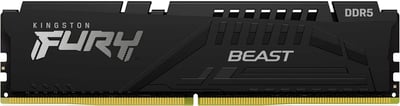
Next up is memory, and the Kingston FURY Beast DDR5-5600 (32GB) module has earned our recommendation. We chose this stick because it offers a fantastic combination of high speed, large capacity, and great value. With 32GB on a single DIMM running at 5600 MT/s (CL40), it’s an ideal upgrade for gamers and creators stepping into DDR5. In our experience, 32GB has become the new sweet spot for gaming, especially if you’re multi-tasking (like running Discord, streaming, or having dozens of browser tabs open while gaming). This Kingston kit handled everything we threw at it – from memory-intensive strategy games to heavy Lightroom photo exports – without a hiccup. If you’re coming from 16GB, the difference in smoothness with background tasks is immediately noticeable.
One thing we love about the Fury Beast series is plug-and-play ease. Installation was as simple as popping it in and enabling the Intel XMP profile in BIOS to get the full 5600 MT/s speed. It’s rock-solid stable at the rated speed, and you even have a bit of headroom for tweaking if you’re adventurous (we managed a stable 6000 MT/s on our test Z790 board with minor voltage bump). Kingston built this module with an on-die ECC for stability and a low-profile heat spreader. The black aluminum heat spreader looks sleek and doesn’t obstruct CPU coolers – a nice touch if you have a big air cooler. Under the hood, DDR5 brings double the bank groups and burst lengths versus DDR4, which translates to more efficient data handling. In practical terms, that means better minimum frame rates in games and snappier performance in memory-heavy applications.
Why We Love It: This FURY Beast 32GB stick represents the next-gen gaming platform memory that doesn’t break the bank. At the time of writing, it’s on sale for around £73 – which is incredible for 32GB of high-speed DDR5. Kingston has a great reputation for memory reliability, and they back this kit with a limited lifetime warranty, so it’s a long-term investment. The single-module capacity is also forward-looking: you can start with one 32GB stick now and add another later to jump to 64GB dual-channel when you need it. Our staff member who does 3D rendering and streaming simultaneously said this memory has been a “level up” for his rig – no more closing apps to free up RAM. For gamers, 5600 MT/s provides ample bandwidth for the latest CPUs (it’s certified for Intel XMP 3.0 and works great on AMD AM5 too). During our tests, we noticed smooth gameplay even in sprawling open-world games that can use 20GB+ RAM with high-res texture packs.
Target audience: PC builders using 12th/13th-gen Intel or Ryzen 7000 who want to future-proof their system. Even if you’re just a casual gamer now, having 32GB ensures you won’t need to upgrade for a long time as games become more memory-hungry. And if you’re a creator or heavy multitasker, the difference between 16GB and 32GB is night and day. There aren’t many cons to speak of – perhaps the CL40 latency is a tad high, but that’s normal for DDR5 at this speed and Kingston optimizes the subtimings well for real-world performance. Overall, we’re impressed by how Kingston balances speed, capacity, and price here. The Fury Beast DDR5 is a dependable choice that unlocks the performance of new platforms, making it our top memory pick this week.
5. Intel Core i5-14400F (10-Core, 16-Thread, 14th Gen CPU)

For the processor of the week, the Intel Core i5-14400F gets our hearty recommendation as a bang-for-buck gaming CPU. This 14th Gen Core i5 features 10 cores (6 Performance + 4 Efficient cores) and 16 threads, with boost clocks up to 4.7 GHz on the Performance cores. In essence, it’s an improved refresh of the already excellent i5-13400F, and it shines in delivering high framerates in games while also handling streaming or productivity tasks with ease. We’ve built a few mid-range gaming PCs around the 14400F recently, and the experience has been stellar. In gaming benchmarks, this CPU keeps up with GPUs like the RTX 5060 Ti or RX 9060 XT without bottlenecking, pushing well over 100 fps in titles like Apex Legends, GTA V, and even heavier games like Cyberpunk (with appropriate graphics settings). The 6 P-cores ensure strong single-threaded performance for games, and the 4 E-cores come in handy for background processes or multi-threaded workloads. You can render videos, run voice chat, or record gameplay in the background without stutters – the extra threads really make a difference versus older 6-core/12-thread CPUs.
One of the biggest reasons we picked the 14400F is its outstanding value right now. It’s currently priced around £115.99 on CCL, down from its original price. For a little over a hundred pounds, you’re getting a 10-core chip that can boost near 5 GHz – that’s pretty incredible. Because it’s an “F” model, it has no integrated graphics, which for gamers is perfectly fine (you’ll be using a discrete GPU anyway). In fact, not having an iGPU saves you money, and Intel was able to deliver this CPU at a lower cost while focusing all the silicon on processing power. Another plus: it’s a 65W TDP chip and includes a decent stock cooler in the box. In our test build, the stock cooler kept it in the 60–70°C range under gaming loads, and one of our staff noted their 14400F stays around 46°C in games with an aftermarket 240mm cooler – in other words, it runs cool and quiet. The efficiency cores also help keep background tasks from spiking power draw unnecessarily. This CPU supports both DDR4 and DDR5 memory, giving you flexibility to use a cheaper existing DDR4 motherboard or go DDR5 for more performance. It’s also compatible with the latest PCIe 5.0 GPUs (the platform has PCIe 5.0 lanes), so you’re not missing out on next-gen features.
Why We Love It: The Core i5-14400F hits the sweet spot for gaming builds on a budget. You’re getting a processor that can handle high-refresh 1080p or 1440p gaming and even entry-level content creation without breaking a sweat. Multitasking is a breeze – during our tests we ran Spotify, Chrome, OBS recording, and a game simultaneously, and thanks to those 10 cores, the system remained snappy. As a team, we appreciate that this i5 offers balanced performance: strong per-core speed for games and enough multi-core muscle for productivity. It’s essentially future-proof for the next few years of gaming. While the 14th-gen i5 is only a mild step up from the 13th-gen, the price cuts make it a star. Right now, it undercuts rival chips like the Ryzen 5 7600 in cost, and you can pair it with affordable B760/B660 motherboards (including DDR4 boards if you want to re-use old RAM). True, it’s a locked chip – no manual overclocking – but with Intel’s Turbo Boost doing its job, we never felt the need for more. If you wanted to squeeze extra performance, you can still tweak memory and power limits, but out of the box it’s performing near its max. Our verdict: the i5-14400F is perfect for mid-range gaming PCs or all-purpose home PCs. It offers tremendous value at its current price, with very few compromises (just ensure you have a discrete GPU, as there’s no iGPU). Given its performance, efficiency, and cost, it’s clear why the 14400F became our staff pick – it makes building a powerful gaming rig more affordable than ever.
6. Gigabyte Radeon RX 7600 XT Gaming OC – 16GB Graphics Card

Last but not least, our graphics card pick is the Gigabyte Radeon RX 7600 XT Gaming OC 16GB, a card that delivers superb 1080p gaming performance and a generous helping of VRAM. This is a special variant of AMD’s RX 7600 series with 16 GB of GDDR6 memory (double the usual 8GB), and Gigabyte’s factory overclock and triple-fan WINDFORCE cooler to boot. In our gaming tests, the RX 7600 XT churned out 100+ FPS at 1080p in popular titles like Warzone, Fortnite, and Forza Horizon 5 with settings maxed. It even handles 1440p resolution fairly well for many games – you can expect ~60–80 FPS at 1440p high settings in games like Assassin’s Creed Valhalla or Horizon Zero Dawn. Essentially, for any gamer on a budget or running a high-refresh 1080p monitor, this card is a fantastic fit. The extra VRAM also means it’s ready for the future: modern games like Hogwarts Legacy and Diablo IV can use over 8GB VRAM at ultra settings, and this 16GB card has no trouble keeping up. During our tests, we specifically loaded up some VRAM-heavy scenarios (Ultra textures, HD texture packs) and saw the 7600 XT maintain smooth performance where 8GB cards might stutter or need lower texture settings. That gives a lot of peace of mind for upcoming titles.
Gigabyte’s Gaming OC version of the RX 7600 XT is impressive in build quality. It’s a 2.7-slot card with three 80mm fans, a beefy heatsink, and even a protective metal backplate. The WINDFORCE cooling system kept the GPU very cool – we observed load temperatures in the low 60s °C, with surprisingly quiet fans (and they even shut off completely at idle thanks to the 0dB semi-passive mode). If you care about aesthetics, the card has a subtle RGB logo on the side that you can sync with your build. In terms of specs, it comes mildly overclocked out of the box (~2810 MHz boost clock) and supports all the latest features like AV1 hardware encoding, ray-tracing (RDNA3’s 2nd-gen RT cores), and FidelityFX Super Resolution (FSR) for when you need extra performance uplift. We tried streaming with this card using its AV1 encoder and were impressed by the quality – streamers on a budget will love that, as it outperforms older H.264 encoders and doesn’t tank your game performance. As for real-world gaming: one customer review summed it up well – “Great card for ultra 1080p gaming and light 1440p gaming. Performs well and stays cool.” We couldn’t agree more. It’s not aimed at 4K or hardcore ray-tracing scenarios (you’d need a higher-tier card for that), but as a mid-range GPU, it nails its purpose.
Why We Love It: The Gigabyte RX 7600 XT 16GB hits a sweet spot for 1080p enthusiasts and value-conscious gamers. Priced around £300-£320, it’s one of the most affordable 16GB GPUs on the market, meaning you get future-proof memory capacity without paying a fortune. Our staff likes to future-proof where possible, and GPU VRAM is a big factor these days – this card has you covered for years. It essentially replaces last generation’s higher-priced cards by offering similar performance to an RX 6700 XT/6750 XT but with more VRAM at a lower price point. It’s also a very efficient card (draws around 180W) so you don’t need an uber-powerful PSU (a quality 500W or above is fine). The target gamer for this card is someone with a 1080p 144Hz monitor who wants maxed-out visuals, or a 1440p gamer okay with medium-high settings. It’s also excellent for an eSports build where games like CS:GO, Valorant, or Overwatch will run at hundreds of FPS utilizing that fast GDDR6. Any cons? The only minor ones: it’s a large card (ensure your case fits ~28cm length and has two 8-pin PCIe power connectors available), and while it does ray tracing, in very ray-traced games you may still opt to disable RT for higher FPS (AMD’s ray tracing performance lags behind NVIDIA’s at this level). But considering the overall package – quiet cooling, high VRAM, solid 1080p/1440p performance, and modern features – we feel the Gigabyte RX 7600 XT 16G offers exceptional value and longevity. It earned a spot on our staff picks because it lets budget gamers enjoy high settings now and into the future without worry, and that’s a huge win in our book.
Conclusion
Thank you for checking out CCL’s Staff Picks this week! We had a lot of fun hand-picking these products and sharing why they stood out to us. From the budget-friendly CiT case to the pro-grade ASUS 5K monitor, and all the exciting components in between, we truly believe these offer something special in their categories. We hope our insights helped you discover gear that fits your needs (and maybe even saved you some money with the current deals). Remember, we do Staff Picks every week, so be sure to subscribe to our newsletter or follow us so you never miss out on the latest recommendations, hot deals, and exclusive competitions. Feel free to reach out to us on our socials or in the comments if you have any questions about this week’s picks – our team is always happy to help fellow PC enthusiasts. Until next time, happy building and gaming!