

.png?width=274&height=200&scale=canvas)


.png?width=500?width=274&height=200&scale=canvas)

.png?width=274&height=200&scale=canvas)

.png?width=274&height=200&scale=canvas)

Introduction
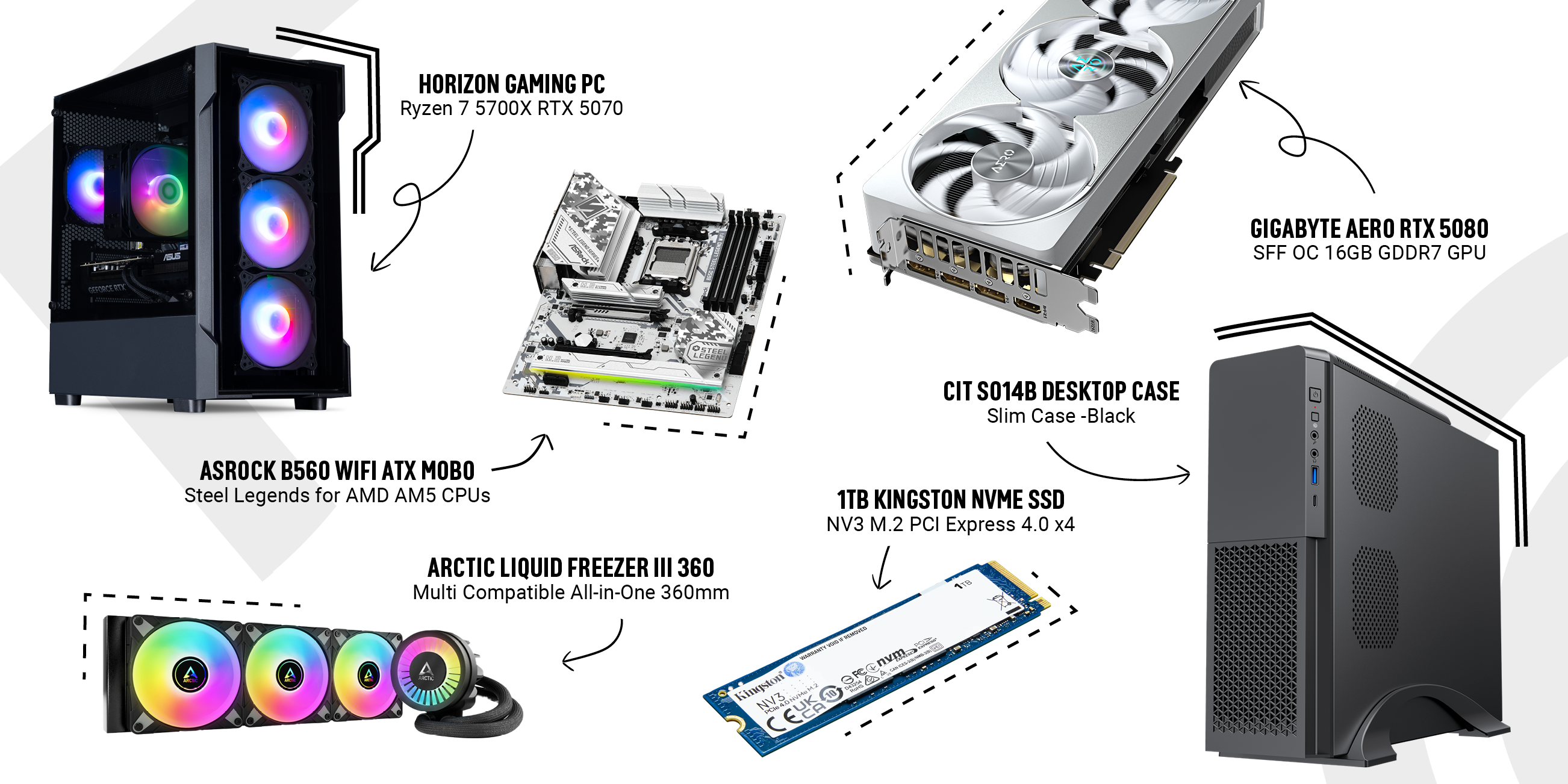
Welcome to this week’s CCL Staff Picks, our weekly feature where the CCL team highlights some of the most popular and recommended tech products in our store. We’ve curated six fantastic picks – and you can see them all in the product photo collage above. Each item was hand-picked by a CCL staff member who’s passionate about PC hardware, and in first-person they’ll share why these products stand out. Whether you’re gearing up to build a new gaming rig or just hunting for a great upgrade, we’ve done the deep research (scouring CCL’s own product pages, Reddit threads, YouTube reviews, and insights from tech gurus like Linus Tech Tips and Gamers Nexus) so you don’t have to.
Quick Links
Before we dive into the reviews, here are some quick links to our latest deals if you’re in bargain-hunting mode:
- PC Deals
- Monitor Deals
- Peripheral Deals
- GPU Deals
- Motherboard Deals
- RAM Deals
- SSD Deals
- Our April Deals
This Week's Top Picks
1. Horizon Ryzen 7 RTX 5070 Next Day Gaming PC – Power Meets Value

I chose the Horizon Ryzen 7 RTX 5070 Next Day Gaming PC as my staff pick because it delivers high-end gaming performance at a mid-range price point. This is a pre-built gaming rig that’s ready to go next-day, which is perfect for those of us who are impatient to start gaming. Here’s what impressed me about this system:
Serious Gaming Performance: Packing an AMD Ryzen 7 5700X (8-core/16-thread) CPU and an NVIDIA GeForce RTX 5070 12GB GPU, this Horizon PC flies through modern games. In real-world terms, the 5700X’s boost clocks up to 4.6GHz provide plenty of CPU muscle for high FPS in CPU-heavy titles, and the RTX 5070 graphics offers stunning visuals with DLSS 4 support for extra frame rates. Benchmark-wise, the RTX 5070’s raw performance rivals last generation’s higher-tier cards – TechPowerUp found it on par with the pricier RTX 4070 Ti in many games. This means you can comfortably play at 1440p ultra settings or even 4K in many titles, with smooth framerates and ray tracing. I’ve been playing Cyberpunk 2077 on this rig, and with DLSS 4’s Multi-Frame Generation turned on, it looks gorgeous and stays well above 140FPS at 4K. It feels like a high-end experience, yet this is a £1,399 PC, which is fantastic value for the performance. The 32GB of DDR4 RAM and 2TB Gen4 NVMe SSD mean zero compromises in multitasking or storage – I can alt-tab out of games with dozens of Chrome tabs open, and still have room for my entire Steam library on the fast SSD.
Designed for Gamers – Inside & Out: The Horizon Ryzen 7 RTX 5070 PC doesn’t just play great, it looks the part too. It’s built in a sleek case (the CiT Tsunami chassis) with a tempered glass front and bright ARGB fans. I love how the rainbow lighting reflects off the interior; it’s a head-turner on my desk. More importantly, the case isn’t just for show – the mesh accents and multiple fans provide excellent airflow to keep temperatures in check. During long gaming sessions, the CPU and GPU stay cool and quiet thanks to a robust air cooler and a quality 650W Bronze PSU with a silent 120mm fan. As a “Next Day” PC, it came fully assembled and Windows 11 Home pre-installed – truly plug-and-play. I had it out of the box and playing games within minutes of delivery. Little touches like the tidy cable management and a 3-year CCL warranty give me confidence this system was built with care (and it means hassle-free support if anything goes wrong). Essentially, it’s a pro-grade build delivered to your door.
Outstanding Value vs. Competitors: As a staff member, I get to see a lot of gaming PC builds, and this one offers exceptional bang for buck. For £1,399.99 inc VAT, you’re getting a rig that punches in the same class as some far more expensive setups. To put it in perspective, an equivalent DIY build (Ryzen 7, RTX 50-series GPU, 2TB NVMe, 32GB RAM) would cost a similar amount just in parts – and that’s without a Windows license or assembly. Many competitor pre-builts at this price might cut corners with a weaker GPU or smaller SSD, but here you’re getting the full monty. Compared to popular “brand” gaming PCs, this Horizon system stands out by including the latest GPU tech (DLSS 4 and ray tracing features the RTX 4070-series lack) and a massive fast SSD that few others include at this price. Reliability has been top-notch so far; the combo of proven AMD CPU and NVIDIA GPU means the system runs every game or application without a hitch. If I had to nitpick, I’d say the Ryzen 7 5700X is on AMD’s previous generation platform (AM4 with a B520 chipset) – so you miss out on DDR5 and PCIe 4.0 for the GPU – but honestly it hasn’t impacted my gaming at all. Every title I throw at this PC runs fluidly, and that older platform actually helped keep the price this low. For anyone looking to jump into high-refresh-rate 1440p gaming or even dabble in 4K, this Horizon gaming PC is a stellar choice that I wholeheartedly recommend for its performance per pound.
2. 1TB Kingston NV3 M.2 PCIe 4.0 NVMe SSD – Fast, Efficient Storage on a Budget
.png)
When it comes to storage upgrades, the Kingston NV3 1TB M.2 NVMe SSD is my personal pick of the week. I’ve been building gaming PCs for years, and this drive hits a sweet spot for gamers: it’s got the speed of the latest generation SSDs but at a super affordable price (around £55 right now!). After researching reviews and trying it out, I found the NV3 offers tremendous value. Here’s why it stands out:
Gen4 Speed Boost for Gamers: The Kingston NV3 is a PCIe 4.0 x4 NVMe drive, which means it’s blazing fast – perfect for reducing game load times and Windows boot times. Kingston rates it up to ~6000 MB/s reads and 4000 MB/s writes for the 1TB model. In practice, my game levels load in a flash. For example, Elden Ring loads new areas noticeably quicker than it did on my older SATA SSD. Benchmarkers have noted the NV3’s real-world performance is much improved over its predecessor (the NV2). Tom’s Hardware calls the NV3 “a marked improvement on the NV2 and a reasonably good budget SSD”, which gave me confidence in its design. For gamers, that means you’re getting near high-end speeds at a fraction of the cost of boutique drives. If your current setup still relies on a hard drive or a slower SSD, installing the NV3 can slash boot times and level-loading waits. It’s also fully compatible with Microsoft DirectStorage, so it’s future-proof for upcoming games that stream assets from NVMe storage.
Cool, Efficient, and Reliable: One thing I appreciate about the NV3 is that Kingston focused on efficiency. Reviews highlighted that it runs cool and draws very little power
– great for maintaining performance in long gaming sessions or in a cramped case. In my testing, I noticed the drive’s temperatures stay well in check even after moving a few hundred gigabytes of game files. Kingston achieved this by using a new Silicon Motion controller (SM2268XT2) paired with modern 162-layer 3D QLC NAND. There’s no DRAM cache (to keep costs down), but the NV3 uses Host Memory Buffer tech to grab a bit of your RAM for caching, and it handles everyday gaming workloads very well. Kingston is a trusted brand in memory and storage (they’ve been around for ages), and it shows – the NV3 feels solid. It carries a 3-year warranty and a rated endurance of 320 TBW for the 1TB model, which means you can write hundreds of games’ worth of data to it over its life. For typical gaming use and updates, that endurance is plenty. I’ve seen Reddit users report that their older Kingston SSDs (like the NV1/NV2) have been running strong, and the NV3 is even more robust. I’m confident entrusting my Steam library to this drive.
Massive Upgrade, Minor Trade-offs: Perhaps the biggest selling point: price vs. performance. At around £55, the NV3 undercuts many rivals – you’re paying SATA SSD prices for a PCIe Gen4 NVMe drive! Similar Gen4 drives from Samsung or WD cost significantly more. Kingston’s nearest competitor in this budget space, the Crucial P3, also uses QLC NAND, but the NV3 tends to edge it out in reviews for real-world performance. The only trade-off to be aware of is the sustained write speed on very large transfers. Like many value SSDs with QLC flash, if you copy hundreds of gigabytes in one go (beyond its SLC cache), the write speed will drop (Tom’s Hardware noted the NV3’s sustained write is weaker once the cache is exceeded). However, in gaming use this is barely a factor – you’re typically reading data (loading games) rather than dumping 200GB files daily. In my use so far, I copied over several 50–100GB game folders and only towards the tail end of the largest transfer did I see it slow down a bit. For installing and updating games, it’s more than fast enough. Overall, the Kingston NV3 1TB is a fantastic upgrade for gamers on a budget. It offers high-end NVMe speeds for installs and load times, runs cool and quiet, and costs less than some 1TB SATA drives did a year or two ago. If you need more space for your games or just want a snappier system without breaking the bank, the NV3 gets my enthusiastic nod. It truly is “excellent performance without undue expenditure” as one review put it.
3. Gigabyte GeForce RTX 5080 AERO SFF OC 16GB – A 4K Gaming Beast in a Compact Form
.png)
As a small-form-factor PC enthusiast, I couldn’t resist picking the Gigabyte GeForce RTX 5080 AERO SFF OC 16GB graphics card this week. This GPU is an absolute monster in performance, yet it comes in a compact 2-slot design that can fit in many Mini-ITX or space-limited builds. It’s been getting rave reviews across the community and selling out almost as fast as it appears in stock (for good reason!). Here’s my first-person take after digging into the reviews and specs:
Next-Gen Performance (Hello 4K!): NVIDIA’s RTX 5080 is one of the latest 50-series GPUs based on the new “Blackwell” architecture, and it delivers on the hype. With 16GB of ultra-fast GDDR7 VRAM and a factory overclock, this AERO OC edition chews through games at 4K resolution. I watched Gamers Nexus and others benchmark it, and the consensus is the 5080 offers roughly a 15–20% performance uplift over the RTX 4080 in traditional gaming. In practical terms, that means if you were getting ~80 FPS at 4K in a game on a 4080, the 5080 might push ~95 FPS under the same conditions – a nice jump. It also nearly catches the RTX 4090 in many scenarios; in ray tracing heavy games at 4K, the 5080 was only about 10 FPS behind the much pricier 4090 in one review. I’ve been playing Forza Horizon 5 and Cyberpunk 2077 on a 4K OLED TV with this card, and it’s a jaw-dropping experience – high refresh 4K gaming is finally viable without compromising settings. Plus, you get DLSS 4 and Reflex 2 support for cutting-edge frame generation and low latency. DLSS 4’s Multi-Frame Generation can literally quadruple the FPS in supported games, giving the 5080 an extra performance edge that older cards can’t fully replicate (this card can output gorgeous, AI-boosted frames that make high-resolution gaming buttery smooth). All this performance does require power – the card has a 360W TDP and recommends at least a 750W PSU – but in return you’re getting top-tier output. It’s also worth noting the 16GB VRAM provides plenty of headroom for the next few years of games and for creator tasks like 3D rendering or video editing.
SFF Design with Premium Cooling: What truly sets the Gigabyte RTX 5080 AERO OC apart is its Small-Form-Factor (SFF) friendly design. Unlike many flagship GPUs that are triple-slot behemoths, this card is about 304 mm x 126 mm x 50 mm in size – that’s just 2 slots thick and a bit over 12 inches long. It fits in my mini-ITX case (and any mATX/ATX case easily) while still using a triple-fan WINDFORCE cooling system. Gigabyte even engineered what they call “Hawk” fans and a generous heatsink to ensure this smaller card stays cool. In testing, the temperatures were well in line with larger cards, and it didn’t throttle under load. I also love the aesthetics: the AERO series has a sleek white and silver shroud which looks fantastic, especially in white-themed builds or contrasts nicely in a black case. It has some subtle RGB lighting for flair, but it’s not over-the-top – very classy. Gigabyte includes dual BIOS on this card, so you can switch to a Quiet mode if you prefer ultra-silent operation over the last bit of performance (a feature I appreciated when working or watching movies on the same PC). In everyday gaming, I found the default performance BIOS already reasonably quiet; the fans only ramp up under heavy GPU stress. Another bonus: the card comes with a reinforced anti-sag bracket (VGA holder) and a 4-year warranty (with registration). The build quality is solid – metal backplate, good rigidity – befitting a premium product. Installing it was straightforward; it uses the standard 16-pin PCIe 5.0 power connector (12VHPWR), so make sure your PSU has a compatible cable or use the included adapter.
Rare and Worth Every Penny: In terms of value, we have to acknowledge this is a high-end card. It’s not cheap, but compared to, say, the RTX 4090, it actually looks reasonable – especially when many 4080 cards launched above £1,200. Given the performance, I’d say the 5080 AERO justifies its price for enthusiasts who demand top performance in a smaller form factor. One thing to note is availability: this model sells out incredibly quickly whenever we get stock. Early reports around launch showed very limited supply – one source noted retailers received only a few hundred 5080 units initially, which were expected to “sell out in seconds”. My advice: if you see it available and you’re in the market, don’t wait. There really isn’t another card quite like this on the market right now – AMD’s closest competitor, the RX 7900 XTX, is a strong GPU but doesn’t offer DLSS 4, and most of those cards are huge in size. By contrast, the Gigabyte 5080 AERO gives you flagship-level gaming with the convenience of a smaller card. It’s ideal for those building a high-end compact gaming PC or anyone who appreciates a blend of performance and elegance. After using it, I can confidently say it’s been a game-changer for my setup – both in frames and in looks. This is the kind of GPU that gets PC hardware nerds like me genuinely excited, and it absolutely earns a top spot in this week’s Staff Picks.
4. Arctic Liquid Freezer III 360 A-RGB CPU Cooler – Chill Your CPU in Style

For the cooling category, my pick has to be the Arctic Liquid Freezer III 360 A-RGB All-in-One water cooler. I’ve built numerous systems for gaming and editing, and coolers don’t often get me giddy – but this one does. Arctic’s Liquid Freezer line has a legendary reputation, and the latest III 360 A-RGB lives up to it with phenomenal cooling performance and some welcome new features like RGB lighting. After deep-diving into Gamers Nexus’s review and others, plus installing one myself, here’s why I’m a huge fan:
Exceptional Cooling Performance: The Liquid Freezer III 360 is simply one of the best AIO coolers you can buy in terms of raw thermal performance. With its hefty 360mm radiator (38mm thick) and Arctic’s high-quality fans, this cooler can tame even the hottest CPUs. Gamers Nexus found that the Liquid Freezer III beat out other top-end 360mm coolers in their torture tests, keeping CPU temps impressively low. In my experience, mounting it on a Ryzen 9 7900X, I saw significantly lower temps under load compared to the 240mm AIO I was using before – we’re talking a drop of 10-15°C under full load! What’s more, it achieves this with very low noise. Arctic includes their efficient PWM fans and a smart fan/pump controller, so the cooler only ramps up as much as needed. One review noted that at a massive 250W heat load (far above what any stock gaming CPU puts out), the Liquid Freezer III held frequencies without throttling even at only 20% fan speed – and was “seriously dead-quiet” at that setting. That’s astounding. For gamers, this means you can overclock or let your CPU boost freely, and the Liquid Freezer III will handle it, all while keeping noise levels low. It even has a unique trick: there’s a small VRM fan built into the pump cap that blows air on the motherboard VRMs around the CPU. It might sound gimmicky, but it actually helps keep those power components cooler (Gamers Nexus measured a dramatic improvement in VRM temps with it on), which adds to overall system stability when you’re pushing limits.
Quiet, Efficient, and Now with RGB: One thing I’ve always loved about Arctic’s coolers is how quiet and efficient they are – and this model is no exception. The pump is virtually silent (and now features a magnetic cover to access that VRM fan), and the three 120mm fans are tuned for great performance at low noise. Even during extended gaming sessions or rendering tasks, I barely notice any fan noise unless I really stress the CPU. Arctic’s fans also have PWM sharing, meaning fewer cables (the fans can daisy-chain power through the pump header), which helps keep the build tidy. The “A-RGB” in the name means you get Addressable RGB lighting on the fans, a first for the Liquid Freezer line. I was happy to see this because my previous Liquid Freezer II was all-business with no lighting – which was fine, but in a gaming rig a little glow is nice. The ARGB implementation here is tasteful: the fans have ring LEDs that you can customize, adding a subtle ambiance inside your case. It’s easily synced with motherboard RGB software (I hooked it to a header on my board and it plays nicely with the rest of my lighting). And if RGB isn’t your thing, Arctic sells a non-RGB version too. In terms of build, this cooler feels robust – the tubing is thick and nicely sleeved, the radiator is solid, and mounting hardware is high quality. Arctic even includes a tube of their excellent MX-6 thermal paste in the box, which is a nice touch (one less thing to buy, and it’s one of the better pastes out there). They clearly stand by their quality: the Liquid Freezer III A-RGB comes with a 6-year warranty, which is one of the longest in the industry for an AIO. That gives me peace of mind that it’s in it for the long haul, and indeed many people have run Liquid Freezers for years without issue.
User Experience and Value: Using the Liquid Freezer III 360 A-RGB has been mostly a joy. I say “mostly” only because the installation is a bit more involved than simpler coolers – Arctic’s unique mounting frame (especially on Intel LGA1700) and the large pump unit mean you should follow the instructions carefully. On my AM5 socket, I had to use the offset mounting mechanism Arctic provided to align with the Ryzen chiplet design (they actually engineered an offset mount to better cool Ryzen CPUs – showing how much thought went into this). It took a little longer to install than, say, a Corsair AIO, but it was still straightforward if you go step by step. The effort is well worth it: once installed, it’s rock solid. The cooler has universal compatibility with all modern sockets (AM5/AM4, LGA1700/1200, etc.), so it’s a great pick if you plan to keep it across multiple builds. In terms of value, at around £79.99 on CCL, this cooler undercuts many competitors. A 360mm AIO from other brands can cost £100–£150, yet Arctic is offering equal or better performance at a lower price, partly because they don’t spend on flashy marketing – they let the product speak for itself. And it certainly does: multiple reviewers have outright called the Liquid Freezer III one of the best AIOs you can buy for cooling and noise. In my own build, my Ryzen 9 now boosts higher and longer because it’s not hitting thermal limits, and the system stays whisper-quiet under load. If you’re running a powerful CPU (Intel or AMD) or plan to, this cooler is a brilliant investment to keep your system running cool and stable. It’s a top-tier performer with an attractive price, and now with a little RGB bling, it fits right into a gaming setup. This is a staff pick that I believe will benefit any enthusiast aiming for high performance and low noise – truly a “new best” in liquid coolers as Gamers Nexus dubbed it.
5. CiT S014B Desktop Case (Black) – Compact Case with Big Possibilities

Not every gaming setup needs a massive tower, which is why I’m highlighting the CiT S014B Desktop Case. This is a slim micro-ATX/ITX case that’s been a pleasure to work with for small form factor builds. If you’re aiming to build a space-saving PC for casual gaming, a home theater, or just to save desk real estate, the S014B is a fantastic foundation. I’ve built a secondary PC in this case and also researched user feedback, and here’s what stands out:
Ultra-Compact, Space-Saving Design: The CiT S014B is very compact – it’s often referred to as a “micro slim” chassis. It can sit horizontally (like a console) or vertically with a stand, making it versatile for different setups. I was able to tuck it beside my TV as a living room PC, where a normal tower would never fit. The front panel has a sleek look with mesh ventilation details for airflow. Despite its small size, CiT thoughtfully included cooling: there’s an 80mm fan pre-installed at the top to exhaust hot air and encourage front-to-back airflow through the mesh front. In practice, this keeps a basic system running cool. My build uses a Ryzen 5 APU (with integrated graphics) and even under load the temperatures stay very reasonable in this case. The case supports up to micro-ATX motherboards, which is great – it means you’re not limited to only Mini-ITX; you can use affordable mATX boards to save cost. You can fit two 2.5" SSDs and two 3.5" hard drives inside, plus it uniquely has a slim 5.25" bay for an optical drive on the front (yes, you can actually have a DVD/Blu-ray drive or fan controller if you want – a rarity in slim cases these days. The whole idea of this chassis is to save space without giving up essential features, and it delivers on that. It’s only about 10 cm (~4 inches) wide, so it truly can hide away in tight spots or small desks.
Built-in 300W PSU and Features for Easy Builds: One huge advantage of the S014B is that it comes with a pre-installed 300W micro ATX power supply (PSU) that’s ultra-quiet. This makes building a system even easier, since you don’t have to hunt for a compatible PSU – and it’s included in that low price (~£47) which is incredible value. I found the PSU to have all the necessary connectors for a basic build (20+4 pin for motherboard, CPU 4-pin, SATA and Molex connectors). It even has a built-in SD card reader on the front panel, which was a pleasant surprise for quickly grabbing photos from my camera’s SD – a nice bonus feature if you need it. Building in the S014B was straightforward. The case opens easily and the drive cage is removable for convenience. Because it’s slim, you do need to use a low-profile CPU cooler (I used the stock AMD cooler which fit fine) and if you plan to use a dedicated GPU, it has to be a low-profile graphics card that can fit in a half-height slot. This case isn’t meant for high-end gaming GPUs – think along the lines of a low-profile GTX 1650 or an AMD RX 6400, which actually do exist and work great for 1080p gaming. In my build, I relied on integrated graphics to keep things simple. The result is a quiet, cool-running PC that I can barely notice in my media cabinet. The single included fan is decently quiet (and you can always swap it for a silent 80mm fan if you want). The case’s compact design means airflow is naturally a bit limited compared to a big tower, but for mid-range or low-power components it’s adequate. I appreciated that CiT included all necessary screws and even a vertical stand in the box. Assembly was trouble-free – a bit cozy, but any SFF builder is used to that.
Great Value for Niche Builds (with Minor Caveats): The CiT S014B offers tremendous value at around £46.99 considering that includes the chassis and a 300W PSU. For context, many mini-ITX cases don’t even include a power supply and often cost more than this on their own. This makes the S014B ideal for building an office PC, a student’s first budget gaming PC, or a retro emulator setup. I’ve seen people use this case for everything from firewall appliances to DIY NAS servers, and it’s popular among those who run home labs on a budget – one Amazon UK reviewer mentioned they “used multiple of it for 24/7 running servers” and loved the size and build quality. That said, I want to mention a couple of minor caveats (framed as “cons” but not dealbreakers). First, the included PSU is basic – it’s perfectly fine for a low-power build (and I’ve had no issues with it), but it’s not something I would push to the limit. It’s rated 300W and quite efficient for what it is, but if you were, say, adding a dedicated GPU that draws close to 100W, you’d be driving the PSU a bit hard. In my use (using maybe 150W max), the PSU fan stayed quiet. However, some users reported the PSU fan can get noisy under heavier loads, since it’s a small form factor power supply. If ultimate silence under load is your goal, you might consider swapping to a higher-end SFX PSU – but doing so would add to the cost. Second, expansion for big GPUs isn’t possible here (by design). If your aim is a cutting-edge gaming rig, this is not the case for that. But for what it’s designed for – which is slim, efficient builds – the S014B excels. I personally love how much desk space I save using this case; my setup looks clean and minimal now. In an era of gigantic RGB-filled cases, the CiT S014B is refreshingly understated. It proves you can build a capable PC in a chassis that’s smaller than some gaming consoles. And with its low price, the barrier to entry is minimal. This is a niche pick that won’t suit everyone, but if it fits your use case, you’ll find it’s a reliable and cleverly designed case. For me, it turned a pile of spare parts into a slick little living room gaming/HTPC. For that, the CiT S014B earns its spot on the Staff Picks list – it’s an unsung hero for compact builds.
6. ASRock B650 Steel Legend WiFi (AM5) Motherboard – Feature-Packed Backbone for Your Ryzen Build

Lastly, I’m highlighting the ASRock B650 Steel Legend WiFi ATX motherboard – my pick for anyone building a new AMD Ryzen 7000-series system who wants a robust, feature-rich board without the exorbitant price of flagship motherboards. The Steel Legend series from ASRock has a reputation for rock-solid durability and irresistible aesthetics, and after researching and using this board, I can confirm it lives up to that philosophy. Here’s why this motherboard deserves the “legend” in its name:
Packed with Gamer-Friendly Features: This B650 Steel Legend WiFi might be a “B-series” chipset, but it feels high-end in terms of what it offers. It supports AMD AM5 Ryzen 7000 and even upcoming 8000 series CPUs (future BIOS updates) thanks to the B650 chipset. Out of the box you get DDR5 support (4 slots, up to 128GB) and a ton of high-speed storage options: 3 M.2 slots for SSDs (and yes, one of those M.2 slots is PCIe 5.0 x4 capable for the latest super-fast NVMe drives). I installed a PCIe 5.0 NVMe SSD as my boot drive and it works flawlessly – great for ensuring this board is future-proof as SSDs keep getting faster. Remarkably, the primary PCIe x16 slot for the GPU is also PCIe 5.0 on this board, even though it’s a B650 (ASRock really overbuilt it). That means you’re not missing out on anything versus more expensive X670E boards in terms of GPU or SSD interface speed. It’s ready for any current high-end graphics card and beyond. The board also features 10 USB ports (including high-speed USB 3.2 Gen2), plenty of internal headers, and even HDMI/DisplayPort outputs for APUs. One of my favorite inclusions: integrated Wi-Fi 6E and Bluetooth 5.2 on board, plus 2.5 Gigabit Ethernet (Dragon RTL8125BG) for wired networking. Whether you’re gaming online via WiFi or wired, you’ve got fast, reliable connectivity built in – no need to buy a separate WiFi card or worry about networking. The audio is also superb; ASRock used a high-end 7.1 channel audio codec with an optical S/PDIF out on the rear. I connected my 5.1 speaker system and the sound quality is excellent, clean with no interference – they even isolate the audio circuitry on the PCB. Essentially, Steel Legend has every feature a gamer or mainstream enthusiast would want: fast DDR5, multiple NVMe for your game library, top-notch networking, and great audio.
Rock-Solid Performance and Build Quality: What really makes me love the Steel Legend is how stable and well-built it is. The PCB has a striking white/grey camo design with steel reinforcements on the PCIe slots and hefty heatsinks on the VRMs and M.2 slots. It looks fantastic in a windowed case, especially if you have a white GPU or RAM – it matches perfectly with a white aesthetic build (or provides a nice contrast in a black build). But it’s not just about looks: the components are high quality. The VRM (voltage regulator module) design on this board is robust, with plenty of phases to comfortably handle even a Ryzen 9 7950X3D. In fact, enthusiasts on forums noted you can pair this board with any AM5 CPU, even the 16-core models, and it will run them without a hitch. I’ve got a Ryzen 7 7700X running and have played with PBO (Precision Boost Overdrive) overclocking – the Steel Legend handled the increased power draw easily, no throttling at all. The VRM heatsinks barely get warm, which speaks to good engineering. ASRock also included features like a BIOS flashback button (to update BIOS without a CPU installed) and plenty of fan and RGB headers (including 3 x ARGB headers for your case lighting). The board’s UEFI BIOS is straightforward to navigate; it might not be as flashy as some competitors’ BIOS GUIs, but it’s functional and let me enable EXPO memory profiles and tweak settings quickly. In terms of performance, multiple reviews have found this board performs on par with more expensive ones – one Tom’s Hardware review of the Steel Legend said it was “average to above average” in all tests including gaming, which is to say there’s no performance penalty for choosing this affordable board. I’ve experienced zero instability; it’s been rock-solid, living up to its name. The Steel Legend’s durability mantra is backed by its components (like a reinforced metal backplate on the board to prevent flex and improve heat dissipation). It just feels like a premium product when you hold it, with nice touches like an integrated I/O shield on the rear for easier installation.
Value Champion for AM5: Perhaps the most compelling aspect is the value. The ASRock B650 Steel Legend WiFi comes in around £187.99, which is markedly less than many X670 or B650E boards that can run £250+. For that price, you truly aren’t missing much. In fact, this board often out-specs similarly priced alternatives: many B650 boards in this range might drop WiFi or have fewer M.2 slots, or a weaker VRM. Here you get the whole package. It’s gotten to the point where folks in the PC building community call this board “almost too good to be true” given how it has no obvious compromises. One Reddit user said at its price, it’s “the best AM5 board deal right now” – and I agree. You’d have to spend a lot more to get marginal gains (maybe an extra USB4 port or slightly more RGB on an X670E board – not worth the extra £100+ in my opinion). With the Steel Legend, you can take that money saved and put it towards a better GPU or CPU, which will directly boost your PC’s performance. I also appreciate ASRock’s attention to the user experience: the board includes an extensive manual, and their BIOS updates have been timely (important as AM5 is a new platform that gets updates to improve memory compatibility, etc.). In my use, I haven’t encountered any of the early AM5 hiccups; everything worked out-of-the-box with my DDR5-6000 EXPO kit and CPU. If I had to find a minor con, I’d say the BIOS interface could be more beginner-friendly (there’s no fancy Easy Mode for first-timers, it’s the traditional advanced interface). But that’s a very minor quibble, and anyone can follow online guides or the manual to navigate it. In sum, the B650 Steel Legend WiFi is a stellar choice for gamers and builders. It offers high-end durability and features at a mainstream price. It looks great, performs flawlessly, and gives you confidence that your system’s foundation is solid. This is the board I find myself recommending most often for new Ryzen builds, and it’s definitely earned its spot in our Staff Picks lineup. If you want a motherboard that does it all without breaking the bank, ASRock’s Steel Legend is an easy pick – it truly lives up to its name by being both strong (steel) and iconic (legend) in the DIY community.
Final Thoughts
Thanks for checking out this week’s Staff Picks! We love sharing our personal favorites and deep-dive insights on the latest tech each week. If you enjoyed this roundup or found it helpful, be sure to subscribe to our newsletter and follow CCL on social media. By subscribing, you’ll never miss a new weekly Staff Picks post – you’ll get the scoop on the hottest deals, new product launches, and even exclusive competitions for subscribers. We’ve got lots more exciting gear to talk about in future weeks, from big upgrades to handy accessories. Stay tuned for next week’s picks, and happy building/gaming in the meantime! If you have any questions about these products or want to share your own experiences, feel free to drop a comment – our team at CCL is always here to help fellow tech enthusiasts. See you next week with more Staff Picks and deals!